
Use Execution Docs to fill your own declaration or assignment template, generate USPTO AIA/01 declarations, or create a joint document for several inventors.
Before you start
Use a DOCX template with supported placeholders. Help → Execution Documents Template Reference explains the fields and provides examples to save and adapt.
Generating a DOCX or an AIA/01 declaration does not require Word. Converting your template output to PDF requires Microsoft Word and, on macOS, the Patent Toolkit Helper. The pane reports missing conversion requirements and offers Helper setup where needed.
Filling in the form
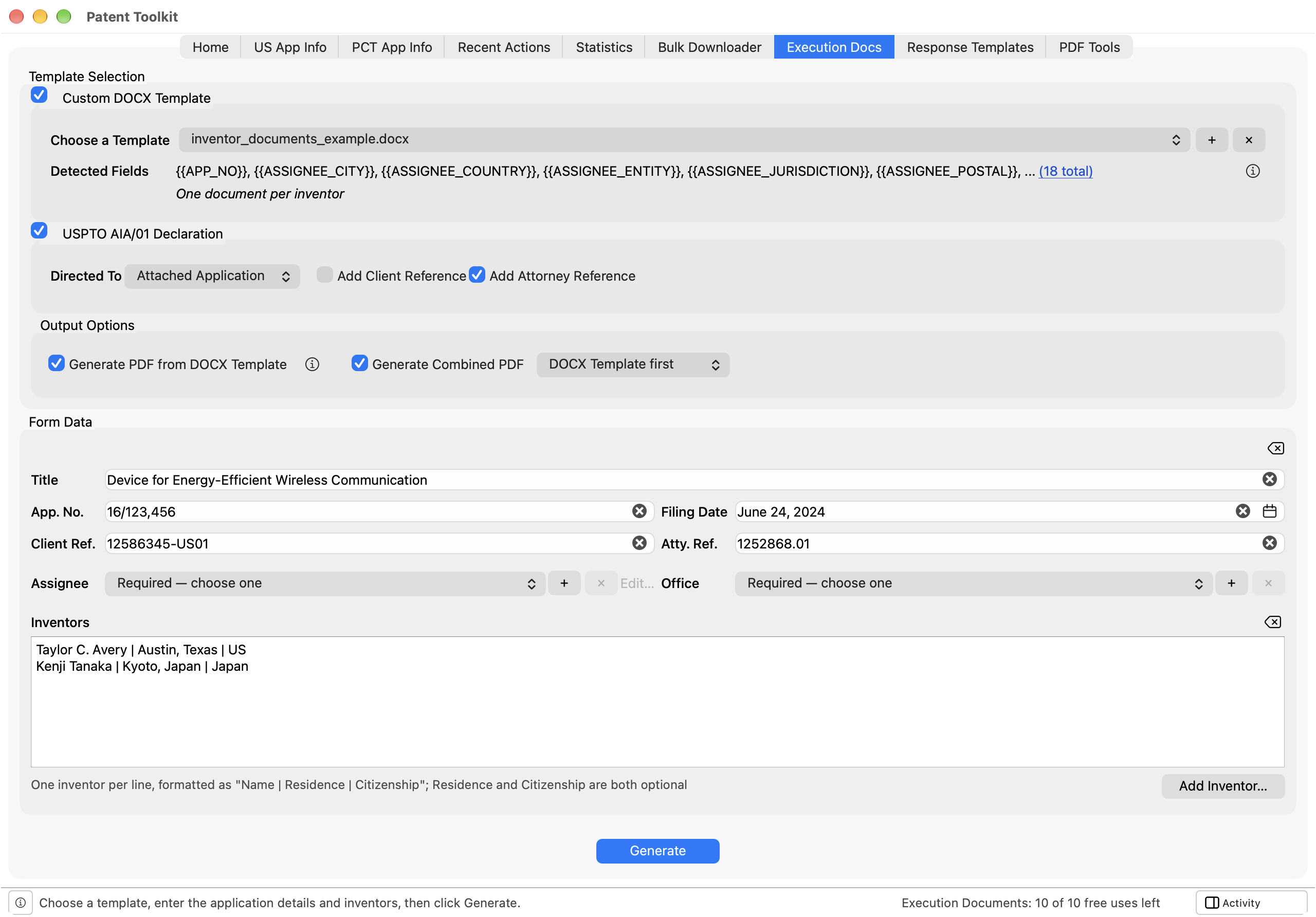
Enter the matter’s title, application number, filing date, and attorney and client references.
Enter one inventor per line, or use Add Inventor… to enter a name, residence, and citizenship. A name alone is sufficient. To enter all three directly, separate them with vertical bars:
Taylor C. Avery | Austin, Texas | US
Kenji Tanaka | Kyoto, Japan | Japan
Choose the Office and Assignee from your saved lists. The controls beside these selectors let you maintain the lists. Assignee records include entity and address details for use in your template; review the template wording for the intended document.
If supported template fields lack values, the app warns before generating. If you continue, inspect the output for unfilled placeholders and blank values. Missing inventor details inside a repeating block become blanks; other unfilled tags can remain visible.
Choosing outputs and saving
Choose your template, the AIA/01 declaration, or both. Available outputs include:
- the filled DOCX;
- a PDF converted from the DOCX, when Word conversion is available;
- the completed AIA/01 declaration PDF; and
- a combined PDF containing the template PDF and declaration, in the chosen order.
The AIA/01 output is flattened so its filled fields are part of the page. Review all generated documents before sending them for signature.
Click Generate. Open or save completed files from the results or Activity. Generation first uses the app’s working area; save files you want to keep to a folder you choose. A run uses one Execution Documents allowance, regardless of the number of inventors.
For worked examples, placeholder syntax, and format choices, see Building individual and joint DOCX templates.
Joint documents
A template with a repeating inventor block produces one template document containing all inventors. The pane identifies this mode before generation. The Template Reference explains the block syntax and provides a joint-document example.
Troubleshooting
- Template PDF conversion is unavailable. Check that Word is installed and, on macOS, follow the Helper setup or update prompt. DOCX and AIA/01 generation remain available.
- A field is blank. Fill its value in the form or the selected Office or Assignee record, then generate again.
- A placeholder remains in the document. Check whether the field has a value, then check its spelling and syntax against the Template Reference.
- Files are not in your chosen folder. Use the result’s save action or Save in Activity to copy the generated files out of the working area.