
Use Bulk Downloader to retrieve English text available through Google Patents for a foreign publication. The output is a PDF of retrieved text, either separate from the publication PDF or appended to it. It may contain office-supplied English, machine-translated sections, or both.
Choose the text and output
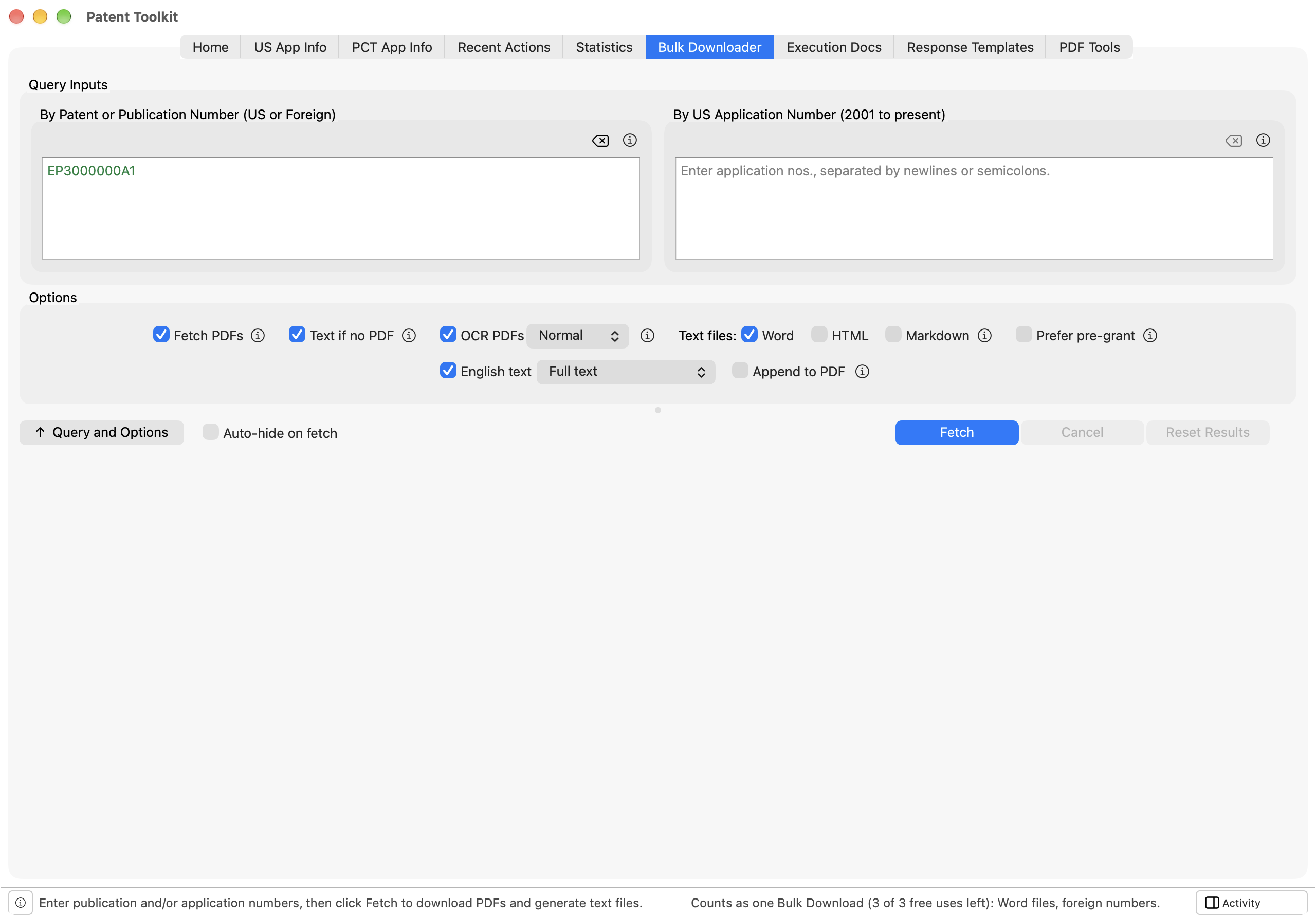
- Enter the foreign publication number, including its country code, in the publication-number box. Use the kind code when you know it, and put each reference on its own line.
- Select English text. Choose Abstract + claims for a shorter output, or Full text to include the available description.
- Select Append to PDF to place the text after the downloaded publication, or clear it to keep a separate text PDF.
- Select Text if no PDF if you want available text even when the publication PDF cannot be retrieved.
- Click Fetch and review the English column. Use the result’s Open Translation or Save Translation… action where available, and save the publication PDF if you need it too.
See Downloading patents in bulk for entering mixed batches, result actions, and saving. A batch containing foreign publications uses a Bulk Downloads allowance.
Read the source and coverage labels
The output identifies the publication, source URL, retrieval date, and source of the English text. Office-supplied English text and English machine translation describe different sources; check the label rather than assuming every English section has the same status.
Full text means the abstract, claims, and description that Google Patents holds for that document. It does not translate text in drawings or a search report. Missing sections are noted in their place. A successful fetch is not proof that every section of the original is present.
Check the publication number, kind code, selected sections, and substantive text against the source publication before relying on the result. A machine translation is not a verified translation, and office-supplied text should also be checked against the publication.
Get text when no publication PDF is available
Text if no PDF can be used by itself: it retrieves available office-supplied English only when a publication PDF is unavailable. Turn on English text as well to allow machine-translated sections. If a PDF is found and English text is off, this fallback does not add a text output.
Text-only output is marked as text only, not the publication. It does not reconstruct the original page layout, drawings, or missing sections. Retain that distinction when saving or sharing it.
OCR is separate from English text
OCR PDFs adds searchable text to a downloaded scan in a supported language. It does not translate the publication. A language or script the bundled OCR cannot read is reported as unavailable for OCR; the downloaded PDF remains usable. English text retrieval may still work because it comes from a separate source.
Troubleshooting
- No English text was produced. Read the English-column explanation. Google may have no text, only a machine translation that needs English text enabled, or no PDF while Text if no PDF is off.
- A row shows N/A. US documents and publications from English-only offices do not need this translation step. Open the publication itself.
- A section is missing. Check the selected scope and the missing-section notice, then consult the source publication. Repeating the fetch cannot supply a section the source does not hold.
- Several unrelated references fail. Follow the connection checks before retrying a large batch.