
Use US App Info to find application details, public file histories, claims, and drawings. For an international application, use PCT App Info.
Finding an application
- Select By App / Pub No. and enter an application number
(
16/123,456), publication number (US20200123456A1), or patent number (10,123,456). - Click Look up by App. No. or Look up by Pub. No., whichever is enabled for the number entered.
- Review the record and its source and coverage information.
To search by attorney docket number, USPTO customer number, or both, select By Docket / Customer No. If several applications match, choose one from the results. Use + and − beside the customer field to save or remove frequently used numbers. The app remembers your search mode.
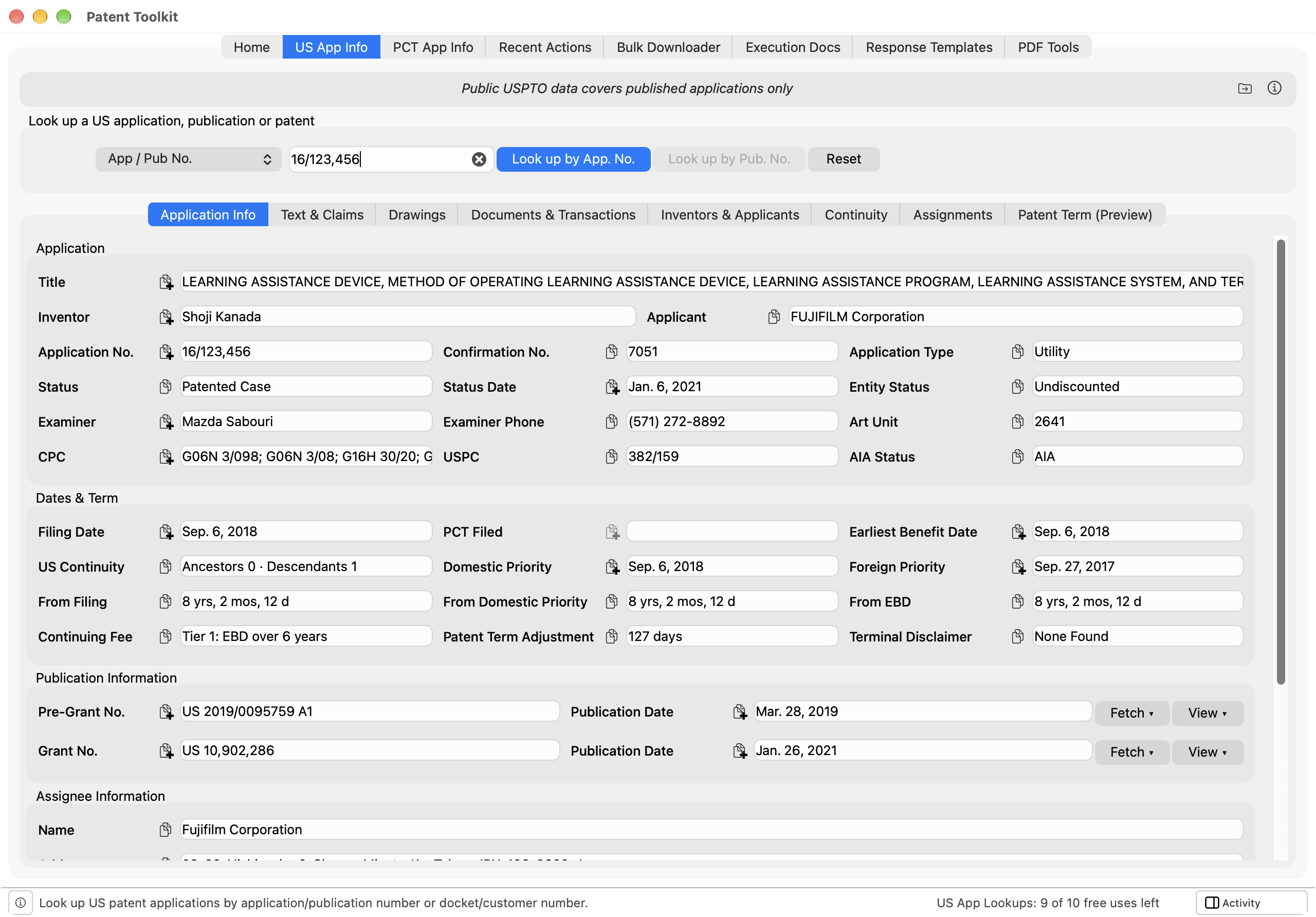
The record
-
Application Info shows bibliographic details, status, entity status, classification, examiner information, publications, assignee, docket number, and customer number. Its Dates & Term section shows the filing date, labeled § 371(c) Date for a national stage application with the international filing date beside it as PCT Filed; the Earliest Benefit Date, from which the twenty-year term runs; the priority dates; the time elapsed since each; the Continuing Fee tier a continuation filed today would incur; and the reported patent term adjustment. Domestic priority includes provisional applications and the earliest benefit date does not, so the two can differ. When the application entered the national stage from a PCT application, continues one directly, or descends from an application that did, the publication section names each such PCT application as PCT App No. with its Relation, one row each, and View opens it in PCT App Info, where its WO publication can be fetched. For a descendant, the relation names the application that entered the national stage or continued from the PCT application, followed by a count of any applications in between, such as via 15/539,050 (+1 more). The Continuity tab lists them.
-
Text & Claims shows available published text, the application as filed, and filed claim sets. See Reading and copying the claims.
-
Drawings shows available original, replacement, and published drawing sets. See Viewing the drawing sheets.
-
Documents & Transactions shows the file wrapper and recorded events. See Reading the file wrapper.
-
Inventors & Applicants, Continuity, and Assignments show the named parties, related applications, and recorded assignment history.
-
Patent Term (Preview) shows the patent term adjustment as the USPTO’s records report it: the A, B, and C delays, the overlap, any manual adjustment, the applicant delay, the net adjustment, and the USPTO’s audit trail of the events it counted. The base and adjusted expiration dates, the terminal disclaimer status, and the maintenance fee dates and statuses are calculated by Patent Toolkit from the USPTO record. The official adjustment is the one printed on the patent, as revised by any certificate of correction; the tab says so when the USPTO reconsidered an adjustment after issue. The tab is a preview: it is new and its figures are still being validated, so they should not be relied upon for legally significant decisions without independent verification. Please send feedback to [email protected].
The USPTO publishes its determination when it sets the issue date, so for most pending applications the tab shows only the base expiration. For a utility or plant patent filed on or after June 8, 1995, the twenty-year term runs from the Earliest Benefit Date, which for a national stage application is the international filing date; the tab notes when that date rests on continuity data that may omit an earlier international application. A design patent’s term runs from its grant, and an older patent’s is the later of seventeen years from grant and twenty from filing. A maintenance fee shows Grace period after its due date, with the date the patent expires if it is not paid, and Not required when the term ends before the fee would keep the patent in force. A patent that lapsed and was reinstated is shown as in force, with a note that it is subject to intervening rights.
An abandoned or terminated application shows the term a patent would have had. A reissue patent runs on the original patent’s term, so its adjustment, terminal disclaimer, and maintenance fee dates are the original patent’s; look up the original patent for them. An original patent that has been reissued says so, and its later maintenance fees are due in the reissue. A provisional application, a reexamination proceeding, and a record imported from Patent Center show no term.
The tab’s messages describe the record and the calculation and name no statute, rule, or case. The ⓘ at the top right of Term & Deadlines lists each rule the dates rest on with its source: the twenty-year term from the earliest benefit date (35 U.S.C. § 154(a)); the older term of the longer of seventeen years from grant and twenty from filing (§ 154(c)); the fourteen- or fifteen-year design term (§ 173); the adjustment and the applications it reaches (§ 154(b); 37 C.F.R. §§ 1.701 to 1.703); a terminal disclaimer’s effect on the term (35 U.S.C. §§ 154(b)(2)(B), 253(b)); a reissue’s term and surrender (§§ 251, 252); and the maintenance fee schedule, grace period, and reinstatement (§ 41(b) and (c); 37 C.F.R. §§ 1.362, 1.378). The ⓘ beside Maintenance Fee Deadlines explains how a payment status is inferred.
Click a table heading to sort. Right-click a table for available copy formats and actions, including opening related applications. Use Go → Back and Go → Forward to return to earlier lookups.
Copying and saving
Use a field’s copy button to copy its value. Hold or right-click the button for other formats, such as a date written numerically or in full.
Publication rows offer a Fetch menu and a View menu where available. Fetch lists PDF, PDF+OCR, Word, HTML, and Markdown; each file arrives in the Activity sidebar. The Word, HTML, and Markdown files are built from publication data, and the Markdown file is the form best suited to an AI assistant. The app also links to Patent Center, Google Patents, and Assignment Center.
A completed lookup produces an Excel workbook in Activity. The Actions menu also offers Excel and JSON exports. Save downloaded or generated files to a folder you choose.
Unpublished and imported matters
For matters without a public record, import your Patent Center applications and correspondence XML exports through File → Import Patent Center Data…. The applications export supplies details and status; correspondence supplies mailings within the exported date ranges.
Imported documents have dashed badges. They identify papers in Patent Center but do not provide downloadable PDFs. Imported transactions are reconstructed from correspondence and the latest transaction recorded in each applications export; they are not a complete history. Check the source notice and verify the record in Patent Center.
See Using Patent Center exports for individual imports and shared-folder setup.
For failures affecting several records, follow the connection checks and support steps.
Troubleshooting
- A lookup returns no record. Check the number and the source or connection message. The record may be unavailable publicly or outside the source’s coverage. For your own unpublished matters, import a current Patent Center export.
- A docket search returns several applications. Choose the intended application; more than one matter can use the same docket number.
- Text or drawings are unavailable. Availability depends on the source documents, not just the bibliographic record. Check the corresponding tab’s message and open the source PDF where available.